


Breeze Airways
4.81.64K Reviews
App Specs
- Version
- 2.458.1
- Updated On
- License
- Free
- Downloads
- 500,000+
- Developer
- Breeze Aviation Group, Inc.
- Categories
- Travel & Local
- Platform
- Android, iOS
Screenshots


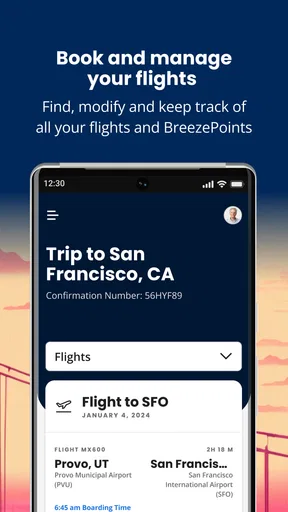

 Analysis by AppCompare
When a flight-booking app goes smoothly, it is easy to forget how many small decisions sit between choosing a trip and being ready to travel. I find Breeze Airways most useful when I already have a rough plan and want to handle the airline-specific steps in one place. It is a free travel app from Breeze Aviation Group, Inc., and its focus is clear: searching for and managing Breeze flights rather than serving as an all-purpose trip planner.
Where booking can get fiddly
The part I would slow down for is not entering the cities and dates; it is comparing the whole trip you are about to buy. A low fare can look attractive at first, but a seat choice, baggage, or another extra can change the total. I would check the details of each option before moving to checkout, especially if you are travelling with a bag or need seats together. That small pause is more useful than choosing the first result that looks cheap.
For a short, flexible getaway, the app’s direct booking flow makes sense. If your dates are fixed, compare the available choices for those exact days rather than assuming a highlighted low fare will suit your schedule. If you have several possible destinations or are weighing airlines, a broader flight-search service may be better for the initial comparison; once you decide on Breeze, the airline’s own app is the more focused place to work through its booking.
Small checks before you begin
I would have the departure and arrival cities, dates, passenger details, and a payment method ready before starting. This is not because the app is unusually demanding; it simply helps avoid switching between screens or trying to remember details mid-booking. If you are travelling with someone else, settle the preferred seating and baggage needs together first. Those choices can affect what you need to review before paying.
On Android, the app is listed for devices running version 7.0 or later, and it is rated for Everyone. It has a 4.8 average from around 14,000 ratings, with more than 500,000 installs. Those figures suggest many travellers use it, but they cannot tell you whether a particular flight, route, or booking arrangement will suit your plans. I would still judge it by how clearly it handles the trip in front of me.
If a booking step does not go as planned
If a search or checkout seems to stall, I would first check the basics: confirm the dates and city selections, make sure the connection is working, then reopen the app and try again. Before repeating a payment attempt, look for a booking confirmation or itinerary so you do not accidentally create a duplicate purchase. That is a sensible precaution in any travel-booking app, especially when a screen has not clearly shown what happened.
Once a trip is booked, keep the itinerary easy to find and check it again before leaving for the airport. Notifications can be handy for changes, but I would not make them my only source of truth: keep the booking details accessible and check the app directly when timing matters. This is particularly useful if you are coordinating a pickup, a connection, or someone meeting you after arrival.
Worth Reading Before You Choose

EA SPORTS FC Mobile 26 Is a Bigger Football Game, but It Takes Time

Flipboard Shows What News Apps Must Do Beyond the Feed

Switching to Android Auto Means Rethinking Your Driving Routine

Google Calendar Makes a Crowded Week Easier to Manage

Ludo King Makes the Most of the Minutes Between Plans

Baby Panda World Brings Quick Play to Modern Phones, but Its Game Library Feels Busy
When another tool may be the better choice
This is an airline app, not a replacement for every travel tool. If you want to compare several carriers across a wide range of dates, a multi-airline search tool is a better starting point. If you want to keep hotel plans, ground transport, and activities together, a broader itinerary organizer may do more for you. I would use those tools for comparison or trip-wide organization, then use Breeze’s app for the Breeze-specific booking and travel details.
The app is a natural fit for people who expect to fly with Breeze and prefer managing the reservation on their phone. It is less compelling if you rarely use the airline, need one place to manage bookings from several carriers, or are not ready to choose a flight and only want to browse possibilities. In those cases, a general travel app or a desktop comparison may be more comfortable before you commit.
First Impressions and Setup
So, I stumbled upon the Breeze Airways app while planning a quick getaway. I’ve heard about their affordable flights and thought, "Why not give it a shot?" The app is available on both Android and iOS, so you’re covered regardless of your device preference.
Downloading and installing the app was a breeze (pun intended!). It’s a small download, so it won’t hog your phone’s storage. Signing up was straightforward too, just the usual – email, password, and a few personal details. I was up and running in no time.
Design and Usability
Now, let’s talk about the design. The app is pretty sleek and intuitive. It’s got this minimalist vibe that makes it easy on the eyes. The navigation is smooth, and everything is exactly where you’d expect it to be. No hunting around for menu items or getting lost in a sea of tabs.
The home screen gives you quick access to search for flights, check your bookings, and manage your account. I appreciated the simplicity because when you’re planning a trip, the last thing you need is a complicated app.
Booking Process
Booking a flight was as simple as 1-2-3. Enter your departure and arrival cities, select your travel dates, and bam! You’re presented with a list of available flights. The app even highlights the cheapest options, so you can save a few bucks. Who doesn’t love a good deal?
The seat selection process is super straightforward too. You can easily choose your preferred seat and add any extras like checked baggage or priority boarding. The checkout process is seamless, with multiple payment options to keep things flexible.
In-App Features
One thing that stood out to me was the app’s personal touch. You can view your travel itinerary, and it’s updated in real-time. Plus, there are push notifications for flight updates, so you’re never left in the dark.
There’s also a nifty feature that lets you track your flight’s status. It’s perfect for those who like to keep tabs on every detail. And if you’re a frequent flyer, the app keeps track of your trips, making it easy to manage past and upcoming flights.
Customer Support
We all know that sometimes things don’t go as planned, so having reliable customer support is crucial. The app offers several ways to get in touch with their support team. Whether it’s through email, phone, or live chat, help is just a tap away. I tested it out with a couple of queries, and the responses were prompt and helpful.
Final Thoughts
Overall, my experience with the Breeze Airways app has been nothing short of pleasant. It’s user-friendly, offers all the essential features for booking and managing flights, and has a clean, modern interface. Whether you’re a seasoned traveler or just planning a quick trip, this app is definitely worth checking out.
So, if you’re on the hunt for a convenient way to book your next flight without breaking the bank, give this app a whirl. Safe travels, and happy flying!
A practical day-of-travel routine
For a realistic use case, imagine booking a weekend trip during a lunch break, then travelling after work a few days later. I would complete the search when I can compare the dates calmly, review the seat and baggage choices, and save the itinerary where I can reach it quickly. On travel day, I would check the flight status before setting off and again if plans around the airport depend on the arrival time. That is a better use of the app than repeatedly opening it without a particular question in mind.
If you are booking for family or friends, decide who will keep an eye on the itinerary and share the relevant details with the people coordinating the trip. A notification is useful, but it does not automatically solve the practical problem of everyone knowing the latest plan. Keeping one person responsible for checking the booking can prevent confusing messages and unnecessary last-minute calls.
What to expect from the experience
The app version is 2.231.1, and Breeze Airways was released on May 21, 2021. I would treat the version as useful context rather than a promise that every screen will behave identically on every phone. If something looks different after an update, give yourself a moment to recheck the labels and booking details instead of tapping through from memory. The app is free to install, but that does not mean the flights or optional travel choices are free; review the amount shown for your own booking before confirming.
One helpful habit is to separate browsing from purchasing. Use a first pass to see which dates and flight options are workable, then make a second pass when you are ready to review passenger information and trip choices carefully. This reduces the chance of treating a quick look at a fare as a completed plan. It also makes it easier to stop and compare elsewhere if the timing or total does not fit.
How I would handle uncertainty
Travel plans can change for reasons that have nothing to do with an app. If the airport is busy, a flight is delayed, or a pickup needs to be rearranged, the booking screen cannot remove that uncertainty. I use the app for the information tied to my Breeze trip, while keeping a separate practical plan for transport and anyone waiting at the other end. That division keeps expectations realistic: an airline app can help me follow a reservation, but it is not a substitute for checking the broader travel situation.
If a detail on the itinerary looks inconsistent with what you remember selecting, pause before making another change. Compare the displayed route and dates with your confirmation, and use the support options when the issue concerns the reservation itself. For general device trouble, a connection check and a fresh app launch are reasonable first steps; for an airline decision or booking question, contacting the airline is more appropriate than repeatedly retrying the same action.
Who will get the most from it
I would recommend Breeze Airways to someone who has chosen Breeze for a trip and wants a straightforward mobile place to search, book, and revisit that airline’s travel details. It is especially handy when the main task is a direct airline booking rather than building an elaborate holiday itinerary. The combination of booking, itinerary access, and flight-status checking makes it useful both before departure and while coordinating the day of travel.
I would not make it my only travel app if I routinely compare many airlines, manage a group’s reservations across different carriers, or need a shared home for accommodation and local plans. In those situations, use a comparison or itinerary tool for the wider picture and keep this app for the Breeze portion. That is not a weakness so much as a sensible boundary: its value comes from being focused on one airline, and its usefulness falls when your travel life is spread across several providers.
My recommendation
In the end, I see this as a practical companion for a specific kind of traveller, not a universal travel dashboard. The clean booking flow is appealing, but I would still inspect the full trip choices, keep confirmation details accessible, and verify important timing directly rather than relying on one alert. Those habits matter more than any polished interface when money and airport plans are involved.
If Breeze is the airline you intend to fly, the app is worth considering as your booking and trip-management tool. If you are still deciding between carriers or want every part of a holiday organized in one place, start with a broader service and return here when a Breeze flight is the right fit. That distinction is what makes my recommendation positive but measured: it does its best work when your trip is already centered on Breeze.
Pros
- User-friendly booking interface.
- Competitive pricing for flights.
- Wide range of destinations.
- Frequent flyer rewards program.
- Efficient customer service.
Cons
- Limited in-flight entertainment options.
- No Wi-Fi available on flights.
- Restricted baggage allowance.
- Fewer meal options on board.
- Infrequent flight schedules.
FAQs for Breeze Airways
What is Breeze Airways app and what features does it offer?
The Breeze Airways app is a comprehensive platform designed to enhance your travel experience with Breeze Airways. It offers features such as booking flights, managing reservations, checking flight status, and accessing boarding passes. The app also provides personalized notifications, travel reminders, and exclusive deals to ensure a seamless journey from start to finish.
Is the Breeze Airways app available for both Android and iOS devices?
Yes, the Breeze Airways app is available for download on both Android and iOS platforms. Android users can find it on the Google Play Store, while iOS users can download it from the Apple App Store. This accessibility ensures that travelers can manage their flights easily, regardless of their device preference.
How secure is the Breeze Airways app for making bookings and payments?
The Breeze Airways app prioritizes user security by implementing robust encryption protocols for all transactions. It ensures that payment details, personal information, and booking data are securely processed and stored. Regular updates and security patches further enhance its reliability, providing users with peace of mind when booking flights or making changes.
Can I access my boarding pass through the Breeze Airways app?
Yes, the Breeze Airways app allows you to access and store your boarding pass digitally. Once you've checked in, you can view your boarding pass directly within the app, making it convenient to navigate through the airport without needing a printed version. This feature streamlines your travel experience and reduces the hassle of handling paper documents.
Does the Breeze Airways app offer customer support if I encounter issues?
Certainly, the Breeze Airways app includes customer support features to assist with any issues. Users can contact customer service directly through the app for inquiries or help with bookings, flight changes, and other travel-related concerns. The app also provides a FAQ section and live chat support for quick resolutions.


